
Organise plans and documents
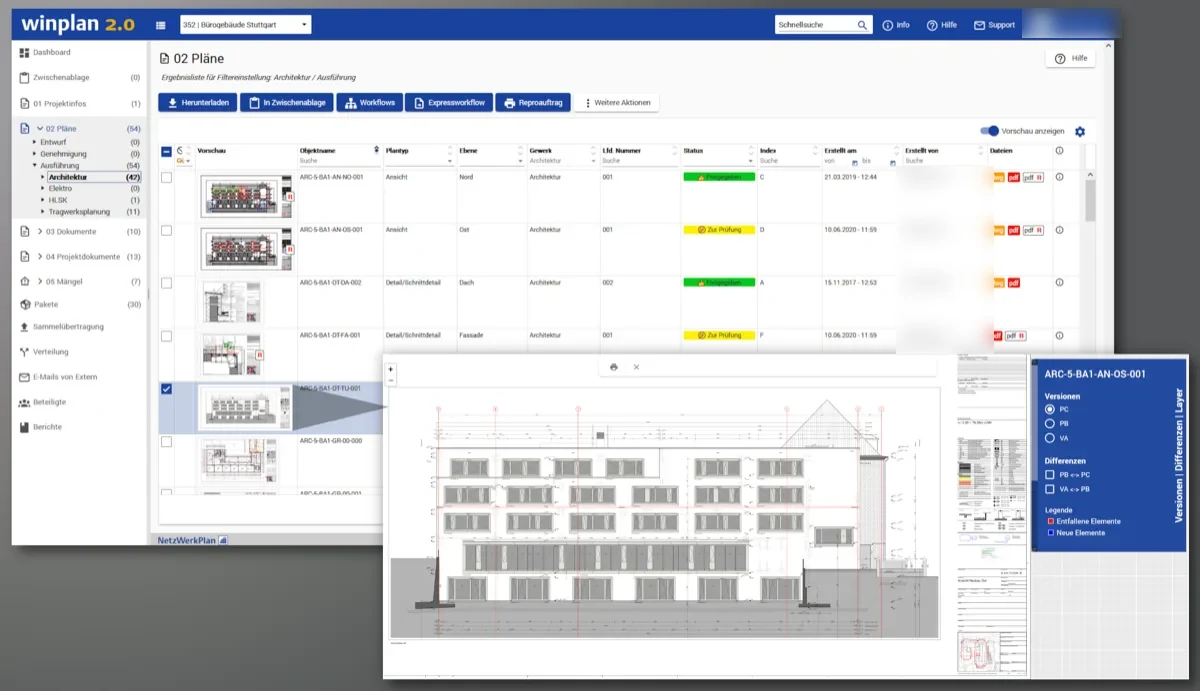
Organise files by their properties and your office or project numbering scheme. Version and status information shows which revision is current, while filters help you find the right plan.
Core platform
winplan 2.0 is the core platform of the winplan product family. It keeps plans and documents organised, tracks their versions and statuses, and distributes them automatically to the right people. The interface is available in English and German.
What winplan is
Construction projects involve many people who need access to the latest information. winplan brings plans, documents, tasks, distribution and approvals together in one project room.
NetzWerkPlan was founded by engineers and has been developing winplan for over 25 years. Experience from large projects informs how the platform is developed.
Features
Organise files by their properties and your office or project numbering scheme. Version and status information shows which revision is current, while filters help you find the right plan.
Use automated workflows to distribute files, with defined criteria, participant groups and download links for documents of any size or number.
Upload hundreds of files at once. Related files are combined into a single plan and sorted by plan number; incorrectly named files are analysed.
View plans without downloading them, open earlier versions, compare changes in colour and add review comments using redlining.
Multi-stage reviews bring in the right people and assign responsibilities at each step. Approved plans are automatically distributed to the construction team.
Give participants access according to their role. Use packages to share selected plans and documents with specific people.
Always current, everything documented
Check a plan’s version, status and permissions in a few clicks. On site, scan its QR code to see whether the printed copy is still current.
Revision C · approvedReview completed
Revision B · reviewedComments incorporated
Revision A · uploadedFirst plan version
Every version remains traceable.
Access based on each person’s role.
Stage 1 · Specialist designReviewed
Stage 2 · Architectural designUnder review
Stage 3 · ClientOpen
Distribution to siteAutomatic
Multi-stage workflows with clear responsibilities.
Working together
Defects, site diaries and BIM models share the same project room, participants and permissions. Activate the modules your project needs.
Platform overview (in German)Plans, tasks, defects and site diaries on your mobile device.
Find out more ProductView and analyse IFC models in the browser.
Find out more ProductBIM CDE for model-based projects.
Find out more ModulePlan distribution, versions, approvals and transmittals in detail.
Explore the module (in German) ModuleApproval processes that everyone can follow.
Explore the module (in German) TrustGerman hosting, ISO 27001 and role-based permissions.
Find out moreIntroduction
NetzWerkPlan sets up winplan for your project and trains your team. We use our experience to help establish your workflows and permissions.
Together, we discuss your project requirements, workflows and permissions.
Your team receives online training to prepare for the project’s operational phase.
Once you have given final approval, your project room is ready to use.
Frequently asked questions
We can answer more of your questions during a live demo.
Request a demowinplan 2.0 is the current generation of the platform. It builds on the established plan server with a project room that also supports workflows, defect management, site diaries, meeting minutes and BIM.
The platform does not limit the number of projects, participants, documents or files. We will explain the specific terms in your quotation.
Versions and statuses show which revision is current, and filters help you find the plan. Scan the QR code on a printed plan with your phone to check whether it is up to date.
All actions and processes are recorded without gaps, and no information is deleted. You can see who received or approved each revision and when.
Yes. You can use winplan in a browser and access project data, defects and site diaries on the move with the Android and iOS app. The interface and support are available in English and German.
In 30 minutes, we will show you the workflows that matter to you. There is no obligation.