
Paper plans, pens and cameras
Recording defects on paper takes time on site and means entering the same information again later.
Platform · Module
Track every defect from the first report on site through to resolution. Record it in the app, add a photo, pin it to a plan and assign a status and deadline.
The problem with defect tracking
Resolving construction defects takes time and can put project schedules at risk. Clear, direct communication helps everyone know what needs to happen next.
Recording defects on paper takes time on site and means entering the same information again later.
Without a location marked on the plan, contractors have to spend time working out where the defect is.
When progress is hard to see, defects can remain unresolved and coordination takes longer.
How it works
Here is how to manage a defect in winplan.
Open the plan in the winplan app, tap to mark the defect, enter the details and add photos. You can do this offline too.
Responsibilities, priorities and deadlines are set. winplan creates and sends letters such as the formal notice of defects (the “Mangelrüge” under German contract practice) with an audit trail.
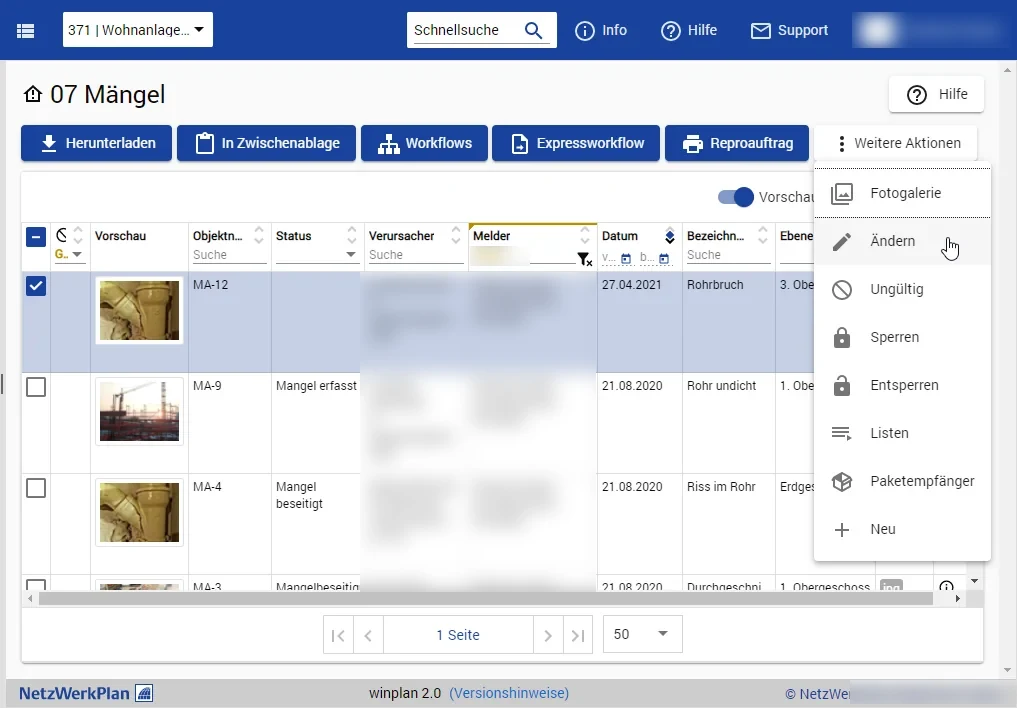
Everyone involved can see the status of each defect, with colour coding to make progress easy to follow.
Every defect stays visible until it is remedied. The entire history is documented.
Features
From recording defects on a mobile device to managing them through workflows, everything stays in the same project room as your plans and documents.
Record defects on site using your mobile device, adding a description and photo.
Keep working without the internet. As soon as the device is online again, the data is synchronised with the cloud.
Mark a defect’s location on the digital plan with a click. The online viewer shows all pinned defects.
Keep the person responsible, the reporter, descriptions, images, plans and other files together. Forms and filing are tailored to your project.
Statuses show progress at a glance, and deadlines help communicate urgency.
Responsibilities are delegated automatically at every step and deadlines are communicated.
Letters such as the formal notice of defects (“Mangelrüge”) are created and sent with an audit trail.
Move from the 2D viewer to defect management in one click and start the relevant workflows.
Who it is for
How the modules work together
Link a defect to its plan, task and site diary entry.
Frequently asked questions
Get in touch if you have any more questions.
Get in touchYes. In the winplan app you work in offline mode. As soon as the device is online again, the data is synchronised with the cloud.
Tap or click the plan to mark the defect’s location. The online viewer shows all pinned defects on the plan.
Relevant project participants are informed of each defect’s status in real time. Responsibilities are delegated automatically.
Letters such as the formal notice of defects (“Mangelrüge”, the notice used under German contract practice) are created and sent in winplan with an audit trail.
In 30 minutes, we will show you the workflows that matter to you. There is no obligation.